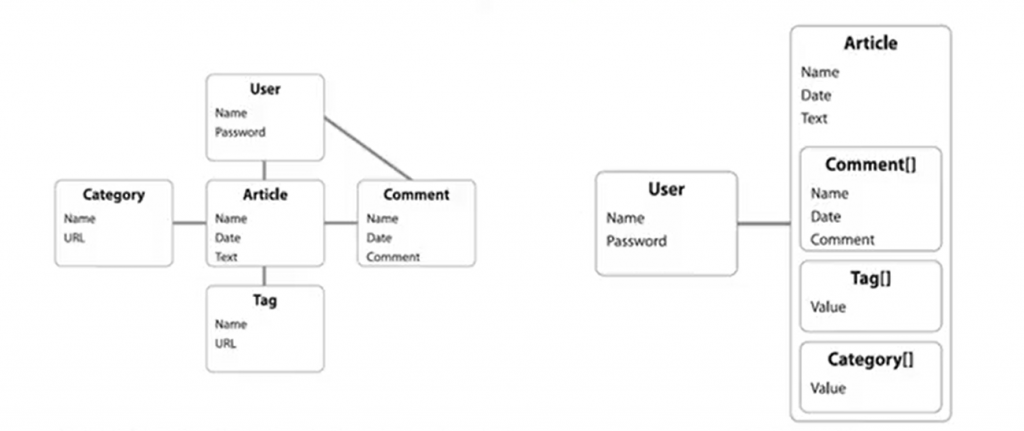
MongoDB 이해해보기
기본 파일 경로
/data/db
환경설정 파일 – mongod.conf
컬렉션(collection)mongoDB의 컬렉션은 DataBase의 하위에 속하는 개념으로 SQL의 테이블과 같은 존재입니다.
일반 컬렉션과 제한 컬렉션
일반 컬렉션동적으로 생성 후 데이터의 추가에 맞춰 크기가 자동으로 늘어남
제한 컬렉션
미리 생성할 때 크기를 고정
생성된 데이터 공간을 큐 형태로 동작
크기를 초과할 경우 오래된 문서에 데이터를 덮어 씌우는 방식
고성능의 로깅 활용에 유용함 일반 컬렉션은 제한 컬렉션으로 바꿀 수 있음
제한 컬렉션은 일반 컬렉션으로 바꿀 수 없음
제한 컬렉션은 샤딩할 수 없음
MongoDB와 SQL
SQL 과 MongoDB 데이터 구조 비교
SQL MongoDB
테이블
컬렉션
행 (row)
BSON 문서
열 (column)
필드
색인 (index)
색인 (index)
테이블 조인 (join)
링킹 (linking)
집계 (group by, SUM(), MIN()… 등)
집계 프레임워크 ($group, $sum, $min… 등)
MongoDB 기본 명령어
show dbsuse sample_mfilxdb// 현재 사용 중인 db 제거
db.dropDatabase();// 일반 컬렉션 생성
db.createCollection(<collection name>)
// 일반 컬렉션 -> 제한 컬렉션 변환
db.runCommand({"convertToCapped": <collection name>, "size" : 10000})
// 제한 컬렉션 생성
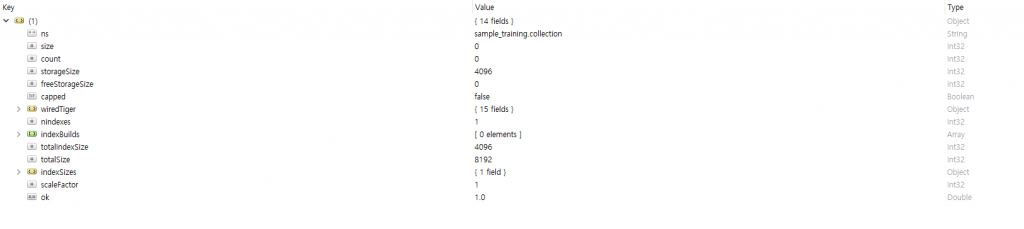
db.createCollection(<collection name>, {"capped": true, "size" : 10000, "max" : 100})db.collection.stats()db.collection.drop()문서 데이터 삽입
컬렉션이 존재하지 않는 상태에서 컬렉션의 첫 insert시 컬렉션 생성이 함께 실행
insertMany – 여러 문서를 일괄적으로 삽입
save, insert, insertOne – 문서를 하나씩 삽입
save – 동일 키 값이 존재할 경우 데이터 덮어쓰기
insert – 동일 키 값이 존재할 경우 에러 발생 E11000 duplicate key error collection: sample_training.user index: id dup key: { _id: ? }
db.collection.insert({a:"a"})
db.collection.insertOne({a:"b"})
db.collection.insertMany( [{a:"c"},{a:"d"}] )

db.collection.save({a:"e"})
문서 데이터 삭제
deleteOne – 입력한 조건과 일치하는 값들 중 가장 앞 순부터 제거
deleteMany – 입력한 조건과 일치하는 모든 값 제거
db.collection.deleteOne({})
db.collection.deleteMany({})
문서 변경
update – 기본적으로 query 조건에 일치하는 첫 번째 문서만 갱신
upsert – query 조건에 일치하는 item이 없을 때 update 조건에 일치하는 item을 새로 생성
multi – query 조건에 일치하는 모든 문서를 갱신
db.getCollection(<collection name>).update(
    {<query>},
    {<update>},
    {
        upsert: <boolean>,
        multi: <boolean>
    }
)
// title 값 Bill of Rights -> Bill Of Rights로 변경
db.posts.update(
{"title": "Bill of Rights"},
{$set: {"title": "Bill Of Rights"}},
{upsert: true, multi: true}
)컬렉션 조회
컬렉션 조회
find
논리 연산자
$or – 조건 중 하나라도 True인 경우
$nor – 모든 조건이 False인 경우
$and – 모든 조건이 True인 경우
$not – 조건이 아닌 경우
비교 연산자
$eq – (equals) 조건 값과 일치하는 값
$gt – (greater than) 조건 값보다 큰 값
$gte – (greather than or equals) 조건 값보다 크거나 같은 값
$lt – (less than) 조건 값보다 작은 값
$lte – (less than or equals) 조건 값보다 작거나 같은 값
$ne – (not equal) 조건 값과 일치하지 않는 값
$in – (in) 조건 배열 안에 속하는 값
$nin – (not in) 조건 배열 안에 속하지 않는 값
요소 선택자
$exist – 특정 필드를 포함하는 조건
$type – 주어진 필드가 특정 필드인 조건
집합, 집계 (aggregate) 연산자
$addToSet – 그룹에 고유한 값의 배열
$first – 그룹의 첫 번째 값
$last – 그룹의 마지막 값
$max – 그룹의 최댓값
$min – 그룹의 최솟값
$avg – 그룹의 평균값
$sum – 그룹의 합계
$slice 연산자 – 배열 필드를 조건 값만큼 자름
$substr 연산자 – 문자열 필드를 조건 값만큼 자름
$regex 연산자 – 정규 표현식 적용
$floor 연산자 – 반올림
group 연산
그 외에도 다양함
// find 구조
db.getCollection(<collection name>).find(
    {<query>},
    {<project>}
)
// aggregate 구조
db.getCollection(<collection name>).find(
{$match : {<match query>},
{$group : {
<group query1>,
total : {<group query2>},
<group query3>
...
}
}
)// group 구조
db.getCollection(<collection name>).group(
{ key, reduce, initial, [keyf,][cond,] finalize }
)db.getCollection('listingsAndReviews').find({})
db.listingsAndReviews.find({})// student_id가 5000인 경우
db.getCollection('grades').find(
{student_id: 5000 }
)
// student_id가 1000을 제외한 900이상, 1100이하인 경우
db.getCollection('grades').find(
{student_id:{$ne:1000, $gte:900, $lte:1100}}
)// 가격이 100이상 105이하의 갯수
db.listingsAndReviews.find(
{
price : {
$lte: 105,
$gte: 100
}
}
).count()컬렉션 조회 distinct 함수
중복 제거
RDBMS의 distinct와 동일
// 가격이 100이상 105이하의 가격 목록을 중복없이 출력
db.listingsAndReviews.distinct(
    "price",
    {
        price : {
            $lte: 105,
            $gte: 100
        }
    }
)
컬렉션 조회 skip 함수
출력시 skip으로 지정한 갯수만큼 앞의 데이터를 제외한 후 출력
RDBMS의 LIMIT begin과 동일
// student_id가 1000이상, 1400이하인 student_id, class_id 값을 앞순 10개 제외 후 조회
db.getCollection('grades').find(
    {$and: [ {student_id:{$lte:1400}}, {student_id:{$gte:1000}} ]},
    {student_id:1, class_id:1}
).skip(10)
컬렉션 조회 limit 함수
출력 갯수 제한
RDBMS의 LIMIT end와 동일
// student_id가 1000이상, 1400이하인 student_id, class_id 값 100개까지 조회
db.getCollection('grades').find(
    {$and: [ {student_id:{$lte:1400}}, {student_id:{$gte:1000}} ]},
    {student_id:1, class_id:1}
).limit(100)# price 오름차순 정렬 (단, 10개 제한 출력)
db.listingsAndReviews.find().sort({price : 1}).limit(10)
# price 내림차순 정렬 (단, 10개 제한 출력)
db.listingsAndReviews.find().sort({price : -1}).limit(10)컬렉션 조회 aggregate 함수
문서를 집합하여 특정 필드로 그룹화하고 결과값을 만듬
RDBMS의 group by와 동일
$lookup – RDBMS의 join과 동일
// price가 100이상 105이하 값 중에 property_type 기준으로 평균 값을 5개까지 조회
db.listingsAndReviews.aggregate([
    {
        '$match' : {
            price : {
                $lte: 105,
                $gte: 100
            }
        }
    },
    {
        '$group' : {
            '_id' : '$property_type',
            'avg_price' : { '$avg' : '$price' }
        }
    },
    { '$limit' : 5 }
])
// name 필드와 founded_year 필드 값의 2번째 값까지만 조회
db.companies.aggregate(
[
{
$project:
{
namesubstr: { $substr: [ "$name", 0, 2 ] },
yearsubstr: { $substr: [ "$founded_year", 0, 2 ]}
}
}
]
)컬렉션 조회 pretty 함수shell에서 사용 시 출력이 정갈하게 나옵니다 // student_id가 1000인 학생의 정보 조회 (단, scores는 첫번째 score만 조회)
db.grades.find({"student_id": 1000}, {scores: {$slice: 1}}).pretty()참고 자료