
Docker – Multi Container와 AWS EB 설정
- Dockerrun.aws.json 파일이란?
- Multi Container의 경우 AWS 설정 파일이 필요한데 Dockerrun.aws.json 이 바로 해당 설정 파일입니다
- 필요한 이유
- Single Container의 경우 하나의 컨테이너만 필요하기 때문에 Dockerfile 만으로 확인이 가능하지만 Multi Container의 경우 컨테이너 간의 실행 순서 등 자동 프로세스가 안되므로 임의 설정이 필요합니다.
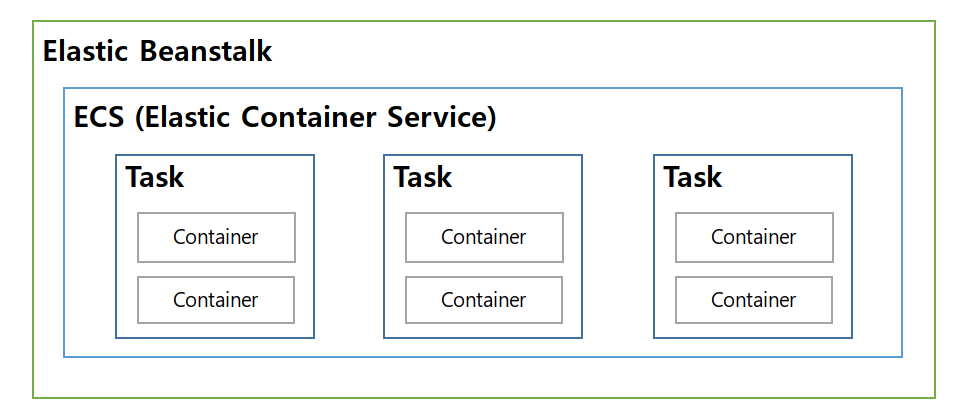
작업 정의 등록은 containerDefinitions 로 명시
- Dockerrun.aws.json 파일 설정
- 각 컨테이너에 사용할 이미지
- CPU 및 메모리 지정
- 작업에 사용할 로깅 구성, IAM 역할
| 명령 | 의미 |
|---|---|
| AWSEBDockerrunVersion | 버전 번호를 멀티컨테이너 Docker 환경에 대한 값 2로 지정 |
| containerDefinitions | 컨테이너 작업 정의 영역 |
| name | 컨테이너 이름 |
| image | Docker Hub에 생성된 Repository 안의 Docker 이미지명 |
| hostname | 호스트명 해당 이름을 통해 Docker Compose의 다른 컨테이너로 접근 |
| essential | 실패시 작업 중지 여부 |
| memory | 사용 메모리 지정 |
| portMappings | 컨테이너에 있는 네트워크 지점을 호스트 지점과 매핑 |
| links | 연결할 컨테이너 목록 연결된 컨테이너를 서로 검색하고 통신합니다 |
| volumes | 작업 컨테이너가 사용할 데이터 볼륨 |
| mountPoints | |
| authentication |
- 간단한 Dockerrun.aws.json 파일 설정
- docker-compose file version 2.4일때 사용 ( Amazon Linux AMI 환경에서 쓰던걸 마이그레이션 )
- docker-compose file version 3 이상은 ( Amazon Linux 2 환경으로 Dockerrun.aws.json 파일이 필요없음 )
{
    "AWSEBDockerrunVersion": 2,
    "authentication": {
        "bucket": "DOC-EXAMPLE-BUCKET",
        "key": "mydockercfg"
    },
    "containerDefinitions": [
        {
            "name": "nginx",
            "image": "docker-hub-id/docker-nginx",
            "hostname": "nginx",
            "essential": true,
            "memory": 128,
            "links": ["frontend", "backend"],
            "portMappings": [
                {
                    "hostPort": "80",
                    "containerPort": "80"
                }
            ],
            "mountPoints": [
                {
                    "sourceVolume": "frontend",
                    "containerPath": "/var/www/html",
                    "readOnly": true
                },
                {
                    "sourceVolume": "backend",
                    "containerPath": "/var/www/html",
                    "readOnly": true
                }
            ]
        },
        {
            "name": "frontend",
            "image": "docker-hub-id/docker-frontend",
            "hostname": "frontend",
            "essential": false,
            "memory": 128
        },
        {
            "name": "backend",
            "image": "docker-hub-id/docker-backend",
            "hostname": "backend",
            "essential": false,
            "memory": 128
        }
    ]
}
댓글 한 개
핑백 :